💻 Uses of Computer for Class 1 Worksheet with Answers
Discover how computers help us learn, draw, write, play and communicate!
🎯 20-Question Online Quiz | ⏱️ 20 Minutes | 📝 Printable Practice
CBSE Class 1 Computer Studies – Uses of a Computer
Question 1 of 20
Uses of Computer for Class 1 Worksheet PDF
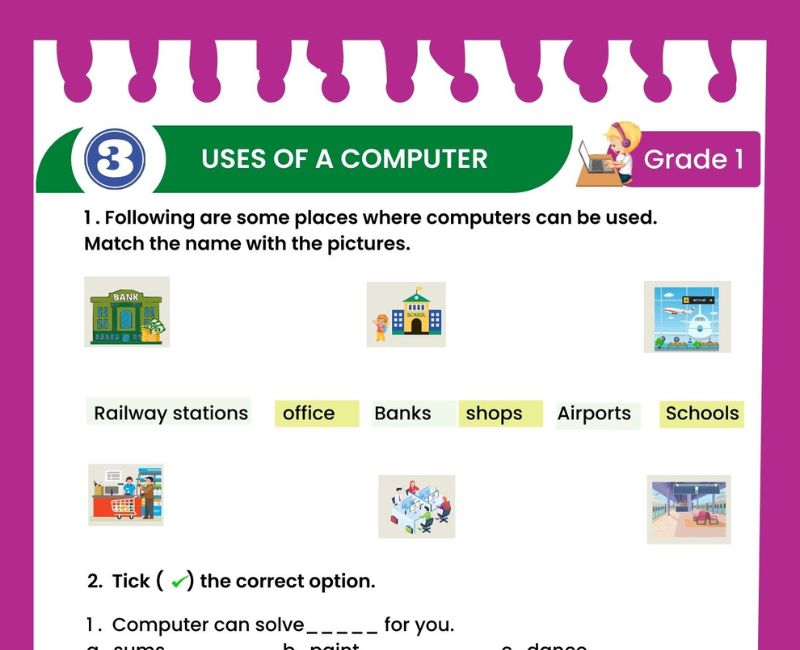
Have you ever used a computer to draw a colourful picture, watch a cartoon or listen to your favourite song? A computer is a useful electronic machine that helps people perform many different activities. Computers are used at home, in schools, offices, hospitals, shops and many other places.
This Uses of Computer for Class 1 Worksheet introduces young learners to the different ways computers make our daily lives easier. Children can learn how computers help us study, type, draw, listen to music, watch videos, play educational games and communicate with people.
Computers are not used only for playing games. They are important learning and working tools. Teachers can prepare lessons on computers, doctors can view medical information, and shopkeepers can prepare bills. Children can also use computers for age-appropriate learning activities under adult supervision.
The printable worksheet is useful for classroom revision, homework and independent practice. Students can identify computer activities through pictures and answer simple questions about what computers can do.
This page also includes additional fill-in-the-blanks, matching exercises, true-or-false questions, short answers and a free interactive quiz with 20 multiple-choice questions.
By learning the uses of computers in Class 1, children begin to understand how technology helps people in everyday life. The topic also encourages curiosity, observation and responsible computer habits.
What Are the Uses of a Computer for Class 1?
A computer is an electronic machine that helps us perform many kinds of work. We can use a computer for studying, writing, drawing, entertainment and communication.
📚 We use a computer to learn new things.
🎨 We use a computer to draw pictures.
⌨️ We use a computer to type words.
🎵 We use a computer to listen to music.
🎬 We use a computer to watch videos.
🎮 We use a computer to play educational games.
📞 We use a computer to communicate with family.
Computers follow instructions given by users and programs. Different applications allow us to perform different tasks.
Five Main Uses of Computer for Class 1
Children can read stories, practise numbers and learn through educational activities.
We can use painting programs to create and colour pictures.
Computers can play songs, rhymes and other audio.
We can watch educational videos and age-appropriate cartoons.
We can talk to family members using video calls and messages with adult guidance.
These five examples are easy for Class 1 children to understand because they are connected to familiar daily activities.
10 Uses of Computer for Class 1 with Examples
| Use of Computer | Simple Example |
|---|---|
| 1. Studying | Learning letters and numbers |
| 2. Drawing | Making a colourful picture |
| 3. Typing | Writing a name or sentence |
| 4. Listening to music | Playing songs and rhymes |
| 5. Watching videos | Viewing an educational video |
| 6. Playing games | Playing an educational puzzle |
| 7. Communication | Talking to grandparents on a video call |
| 8. Calculating | Solving addition and subtraction problems |
| 9. Storing information | Saving pictures and documents |
| 10. Printing | Printing a worksheet using a connected printer |
Ask children to name three computer activities they have seen at home or school. This helps connect the lesson with real-life experiences.
How Computers Help Us at School
Computers are useful learning tools in schools. Teachers can use computers to prepare lessons, show pictures, play educational videos and organise school information.
Students can use computers to practise spelling, learn basic mathematics, draw pictures and complete simple activities. They can also type words using a keyboard and learn how to move a pointer using a mouse.
🏫 Example 1: A teacher shows pictures of animals on a computer.
🔤 Example 2: A student types the letters A to Z.
🔢 Example 3: Children practise counting through an educational activity.
🎨 Example 4: Students draw and colour a flower using a painting program.
Computer activities should be supervised and suitable for the age of the learners.
How Computers Help Us at Home
Computers are also used at home for learning, communication, entertainment and everyday tasks.
👨👩👧 Family: People can talk to relatives using video calls.
📖 Homework: Children can use educational programs for revision.
🎵 Entertainment: Families can listen to music and watch videos.
📝 Writing: People can type letters and documents.
🖼️ Pictures: Families can save and organise digital photographs.
Children should ask a parent or trusted adult before opening unfamiliar websites or communicating with others online.
Uses of Computers in Different Places
Computers are not limited to homes and schools. They help people work in many places.
| Place | Use of Computer |
|---|---|
| 🏫 School | Teaching and learning |
| 🏥 Hospital | Managing patient information |
| 🏦 Bank | Managing accounts and transactions |
| 🛒 Shop | Preparing bills and keeping records |
| 🚉 Railway station | Managing ticket and travel information |
| 🏢 Office | Typing documents and organising work |
| 🏠 Home | Learning, communication and entertainment |
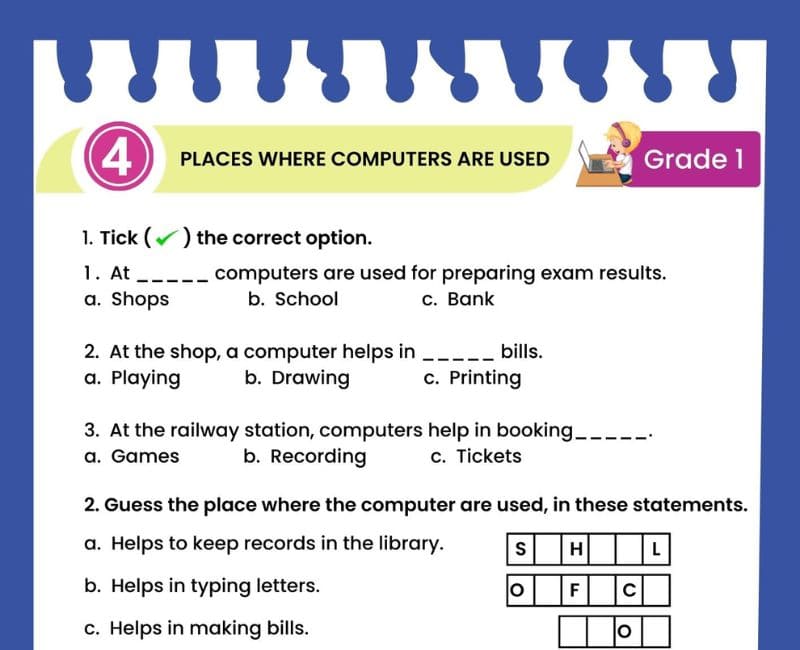
Learn more with the Places Where Computers Are Used Worksheet for Class 1.
Uses of Computer Worksheet for Class 1 – Questions and Answers
Exercise 1: Fill in the Blanks
- We can draw ______ on a computer.
- We can listen to ______ on a computer.
- A computer helps us ______ words.
- We can watch educational ______ on a computer.
- A computer can solve maths ______.
- We can play educational ______ on a computer.
- Computers help teachers prepare ______.
- We can save ______ on a computer.
- A computer can help us make a video ______.
- We should use computers with adult ______.
Show Exercise 1 Answers
1. pictures; 2. music; 3. type; 4. videos; 5. problems; 6. games; 7. lessons; 8. files; 9. call; 10. guidance.
Exercise 2: True or False
- We can draw pictures on a computer.
- Computers are used only for playing games.
- We can type letters using a computer.
- A computer can help us learn numbers.
- We can listen to songs on a computer.
- A computer can cook food by itself like a stove.
- Computers can be used in hospitals.
- We can use a computer to make video calls.
- We should share passwords with strangers.
- Computers can store digital pictures.
Show Exercise 2 Answers
1. True; 2. False; 3. True; 4. True; 5. True; 6. False; 7. True; 8. True; 9. False; 10. True.
Exercise 3: Match the Following
| Column A | Column B |
|---|---|
| 1. Drawing | A. Playing songs |
| 2. Typing | B. Talking to family |
| 3. Music | C. Making pictures |
| 4. Video call | D. Writing words |
| 5. Learning | E. Practising numbers |
Show Exercise 3 Answers
1-C, 2-D, 3-A, 4-B, 5-E.
Exercise 4: Choose the Correct Answer
- Which activity can we do on a computer? (Drawing / Sleeping)
- What can we listen to on a computer? (Music / Rain falling from the screen)
- Which activity helps us write words? (Typing / Swimming)
- Which activity helps us talk to faraway family? (Video calling / Jumping)
- What can a computer store? (Digital pictures / Fresh vegetables)
- Which place uses computers for teaching? (School / Forest)
Show Exercise 4 Answers
1. Drawing; 2. Music; 3. Typing; 4. Video calling; 5. Digital pictures; 6. School.
Exercise 5: Answer in One Sentence
- Write any three uses of a computer.
- How can computers help us study?
- How can we draw pictures on a computer?
- How can computers help us communicate?
- Name two places where computers are used.
- Why should children use the internet with adult guidance?
Show Exercise 5 Answers
- We can use a computer to learn, type and draw.
- Computers help us study through educational lessons, stories and activities.
- We can draw pictures using a painting program.
- Computers help us communicate through messages and video calls.
- Computers are used in schools and hospitals.
- Adult guidance helps children make safer choices online.
Picture-Based Activities on Uses of Computers
Teachers can show pictures representing different computer activities and ask students to identify the correct use.
Activity 1: Look and Tell
Show a picture of a child drawing on a computer. Ask: "What is the child doing?" Expected answer: "The child is drawing a picture."
Activity 2: Circle the Computer Activities
Write the following activities on the board: typing, drawing, sleeping, listening to music, swimming and watching videos. Students circle the activities that can be performed using a computer.
Show Activity 2 Answers
Typing, drawing, listening to music and watching videos.
Activity 3: Draw Your Favourite Computer Activity
Children draw themselves using a computer for a useful activity and explain their picture in one sentence.
Activity 4: Computer Uses Sorting Game
Give children picture cards for studying, playing educational games, video calling and printing. Ask them to sort the pictures into learning, entertainment and communication activities.
Activity 5: Computer Lab Demonstration
During a supervised lesson, demonstrate how to type a name, open a painting program and view an educational picture.
Good Habits While Using a Computer
Computers are useful, but children should learn to use them safely and responsibly.
✅ Sit comfortably while using a computer.
✅ Keep food and drinks away from computer equipment.
✅ Use the keyboard and mouse gently.
✅ Take regular breaks from screen activities.
✅ Ask an adult before opening unfamiliar websites.
✅ Use age-appropriate educational programs.
❌ Do not share personal information with strangers.
❌ Do not pull computer wires or touch electrical plugs.
❌ Do not spend all your free time on screens.
Parents and teachers can encourage a healthy balance between computer learning, outdoor play, reading and other activities.
Benefits of Learning the Uses of Computers in Class 1
Introducing the uses of computers in Class 1 helps children understand how technology is connected to everyday life. Computers are familiar to many students, but they may not realise how many different tasks these machines can perform.
Learning about computer uses develops awareness of technology beyond entertainment. Children discover that computers can support reading, writing, drawing, communication and problem-solving. This helps them understand that a computer is a useful learning tool rather than only a device for games.
Simple worksheets encourage observation and thinking. When children match a picture of a video call with communication or connect a keyboard with typing, they practise recognising relationships between tools and activities.
These exercises also build vocabulary. Words such as drawing, typing, music, communication, learning and printing become meaningful when students connect them with pictures and examples.
Classroom activities can support speaking skills. Teachers may ask students to explain how they use a computer at home or what they have seen adults doing on computers. Children learn to express their observations using short, clear sentences.
Computer education can also introduce responsible digital behaviour. Students learn that adults can help them choose safe activities, that computer equipment should be handled carefully and that screen time should be balanced with other forms of learning and play.
Printable worksheets provide useful revision opportunities. They can be completed individually, discussed in pairs or used as homework. Answer keys help parents and teachers identify concepts that may need further explanation.
The interactive quiz on this page gives children another way to revise. Students answer questions, receive a score and review explanations. The aim is to strengthen understanding, not to replace practical computer activities.
By the end of this topic, students should be able to name several uses of a computer and give simple examples from home, school and other familiar places.
Teaching Tips for Parents and Teachers
Begin the lesson by asking children whether they have seen a computer and what people were doing with it. Accept different examples and connect them with the main uses of computers.
Use colourful pictures to explain activities such as typing, drawing, watching videos and video calling. Real-life examples are easier for young learners to understand than technical definitions.
Encourage children to say complete sentences such as "I use a computer to draw pictures" or "My teacher uses a computer to show lessons."
Include short practical demonstrations when possible. Children can watch a teacher type a word, open a drawing program or display an educational picture.
Use the worksheet to reinforce the lesson through matching, fill-in-the-blanks and short-answer activities. Review incorrect answers with simple explanations.
After completing the topic, encourage students to try the online quiz and discuss the correct answers. Regular short revision sessions can help children remember the different uses of computers.
Related Class 1 Computer Worksheets
Frequently Asked Questions About Uses of Computer for Class 1
What are the uses of a computer for Class 1?
Computers help us learn, draw, type, watch videos, listen to music, play educational games and communicate.
What are five uses of a computer?
Five common uses are learning, drawing, listening to music, watching videos and communicating with others.
What are 10 uses of a computer?
Computers can be used for studying, drawing, typing, music, videos, educational games, communication, calculations, storing information and printing.
How do computers help students?
Computers can help students read stories, practise letters and numbers, draw pictures and complete educational activities.
Can we draw pictures on a computer?
Yes. We can draw and colour pictures using a painting or drawing program.
Can we listen to music on a computer?
Yes. Computers can play songs, rhymes and other audio through speakers or headphones.
Can computers help us communicate?
Yes. Computers can be used for messages, emails and video calls.
Where are computers used?
Computers are used in homes, schools, hospitals, banks, shops, offices and many other places.
How are computers used in schools?
Teachers use computers for lessons and records, while students may use them for learning, typing and drawing.
How are computers used in hospitals?
Hospital staff use computers to manage appointments, patient records and other important information.
Can a computer solve maths problems?
Yes. Computers can perform calculations when given suitable instructions.
Can a computer store pictures?
Yes. Computers can store digital pictures, documents, music and other files.
Are computers used only for games?
No. Computers are used for learning, communication, work, entertainment and many other tasks.
Is this worksheet suitable for CBSE Class 1?
Yes. The explanations and activities introduce basic computer uses appropriate for beginner-level Class 1 Computer Studies.
Can children practise uses of computers online?
Yes. This page includes a 20-question quiz with a timer, score, explanations and a retake option.
🎯 Online Uses of Computer Quiz for Class 1 – Printable PDF and Computer Practice
Use these Uses of Computer worksheets for Class 1 alongside the free interactive quiz to practise identifying how computers help us learn, draw, type, watch videos, listen to music and communicate. Students can answer 20 multiple-choice questions, check their scores and review explanations. This combination of printable Uses of Computer for Class 1 worksheet PDF and online Computer Studies practice supports regular revision at home and in the classroom.
↑ Start the Online Uses of Computer Quiz Download