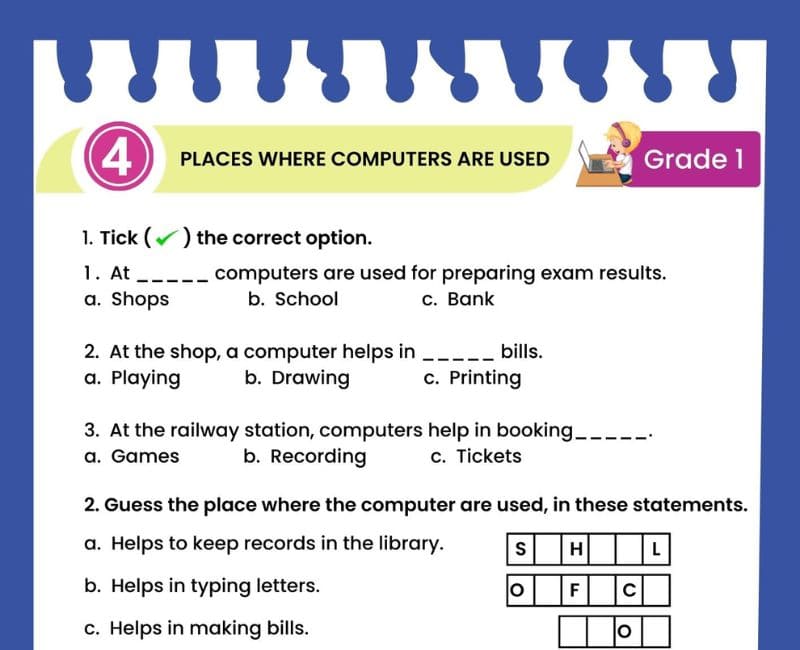
🏫 Places Where Computers Are Used Worksheet for Class 1
Explore computers at school, home, hospitals, banks, shops and many more places!
🎯 20-Question Online Quiz | ⏱️ 20 Minutes | 📝 Printable Worksheet
CBSE Class 1 Computer Studies – Places Where Computers Are Used
Question 1 of 20
Places Where Computers Are Used Worksheet for Class 1 PDF
Have you ever noticed a computer in your classroom, a hospital, a bank or a supermarket? Computers are used in many places around us. They help people learn, work, communicate, keep records and complete important tasks.
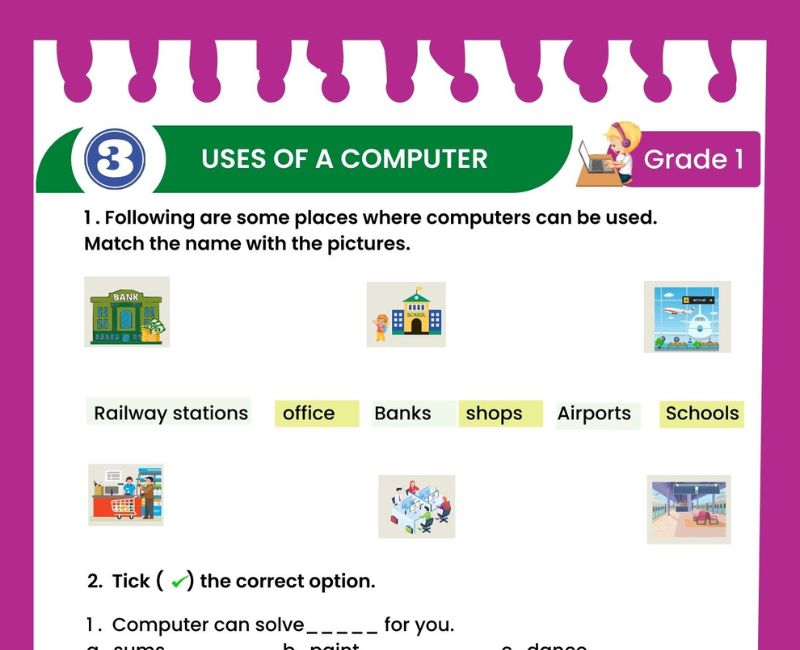
This Places Where Computers Are Used Worksheet for Class 1 helps young learners identify different locations where computers are commonly found. Children learn about computers at home, school, offices, hospitals, banks, shops, railway stations, airports, libraries and restaurants.
Each place uses computers for different purposes. For example, teachers may use computers to prepare lessons, doctors and hospital staff use them to access patient information, and shopkeepers use them to prepare bills.
The printable worksheet encourages children to observe their surroundings and connect familiar places with the tasks performed using computers. Picture-based learning, matching activities and short questions make the topic suitable for beginners.
Parents and teachers can use this worksheet for classroom activities, homework and revision. Students can also complete the 20-question online quiz above to check their understanding.
Learning where computers are used helps children understand the importance of technology in everyday life. It also introduces them to different workplaces and the ways people use electronic machines.
Where Are Computers Used?
Computers are used in many places because they help people perform tasks and manage information.
For teaching, learning and school records.
For studying, communication and entertainment.
For patient records and appointments.
For accounts and money transactions.
For billing and stock records.
For typing documents and organising work.
For tickets and travel information.
For book records and searching for books.
These are some common examples. Computers are also used in airports, restaurants, hotels, factories and many other workplaces.
1. Computers Are Used in Schools 🏫
Schools use computers for teaching, learning and managing school information. Teachers can prepare lessons, show educational videos and create question papers.
📚 Students can learn letters and numbers.
🎨 Children can draw pictures.
📝 Teachers can prepare worksheets.
📋 School staff can maintain records.
Class 1 example: A teacher uses a computer to show pictures of animals during a lesson.
2. Computers Are Used at Home 🏠
At home, computers help family members study, communicate, write documents and enjoy entertainment.
Children may use computers to practise spelling, draw pictures or watch educational videos under adult supervision.
Parents may use computers for office work, paying bills or communicating with relatives.
Example: A child uses a computer at home to practise addition and subtraction.
3. Computers Are Used in Hospitals 🏥
Hospitals use computers to manage important medical information. Doctors, nurses and hospital staff may use computers to view patient records, organise appointments and access test results.
Some medical machines also use computer technology to help healthcare professionals examine patients.
Example: A hospital receptionist uses a computer to book an appointment.
For Class 1 students, the key idea is that computers help hospitals organise information and support patient care.
4. Computers Are Used in Banks 🏦
Banks use computers to manage accounts, keep records and process financial transactions.
Bank employees use computers to help customers with banking services. Automated Teller Machines, called ATMs, also use computer technology.
Example: A bank employee uses a computer to check account information.
Children can remember that computers help banks manage money-related information.
5. Computers Are Used in Shops and Supermarkets 🛒
Computers help shopkeepers prepare bills, check prices and maintain records of products.
Many supermarkets use computerised billing systems. A barcode scanner may be connected to a billing system to identify products.
Example: A cashier uses a computer to prepare a bill for groceries.
Ask children whether they have seen a computer or billing screen while shopping with their family.
6. Computers Are Used in Offices 🏢
Offices use computers to type letters, create documents, organise information and communicate.
Employees may use computers to send emails, prepare presentations and attend online meetings.
Example: An office worker types a letter using a computer.
7. Computers Are Used at Railway Stations 🚉
Railway stations use computers for ticketing, passenger information and train schedules.
Computers can help railway staff check bookings and provide travel information.
Example: A railway employee uses a computer to check a train ticket booking.
8. Computers Are Used at Airports ✈️
Airports use computers for flight information, check-in, ticketing and baggage management.
Passengers may see computer screens displaying flight details and departure information.
Example: Airport staff use computers to check passenger bookings.
9. Computers Are Used in Libraries 📚
Libraries use computers to keep records of books and help readers find books.
A librarian may use a computer to check whether a book is available or to record when a book is borrowed.
Example: A librarian uses a computer to search for a storybook.
10. Computers Are Used in Restaurants 🍽️
Restaurants use computers to record food orders, prepare bills and manage payments.
Some restaurants use digital screens or computerised ordering systems to organise customer orders.
Example: A restaurant cashier uses a computer to prepare a food bill.
Places Where Computers Are Used – Class 1 Chart
| Place | Who Uses Computers? | Purpose |
|---|---|---|
| School | Teachers and students | Teaching and learning |
| Home | Family members | Study and communication |
| Hospital | Doctors and staff | Patient records |
| Bank | Bank employees | Account information |
| Shop | Shopkeepers | Billing |
| Office | Office workers | Documents |
| Railway station | Railway staff | Tickets |
| Airport | Airport staff | Flight information |
| Library | Librarians | Book records |
| Restaurant | Restaurant staff | Orders and bills |
Use this chart for revision after completing the online quiz and worksheet activities.
Places Where Computers Are Used Worksheet – Practice Questions
Exercise 1: Fill in the Blanks
- Computers are used in ______ for teaching and learning.
- Doctors use computers in ______.
- Computers are used in ______ to manage accounts.
- Shopkeepers use computers to prepare ______.
- Computers help railway staff manage ______.
- Librarians use computers to keep records of ______.
- Computers are used in ______ to prepare documents.
- At home, we can use computers to ______ pictures.
- Airports use computers to manage ______ information.
- Restaurants use computers to record food ______.
Show Exercise 1 Answers
1. schools; 2. hospitals; 3. banks; 4. bills; 5. tickets; 6. books; 7. offices; 8. draw; 9. flight; 10. orders.
Exercise 2: True or False
- Computers are used in schools.
- Computers are never used in hospitals.
- Computers help shopkeepers prepare bills.
- Computers are used only at home.
- Libraries can use computers to manage books.
- Banks use computers to manage accounts.
- Computers can help railway staff with tickets.
- Airports do not use computers.
- Office workers can type letters on computers.
- Restaurants can use computers for billing.
Show Exercise 2 Answers
1. True; 2. False; 3. True; 4. False; 5. True; 6. True; 7. True; 8. False; 9. True; 10. True.
Exercise 3: Match the Following
| Column A | Column B |
|---|---|
| 1. Hospital | A. Book records |
| 2. Bank | B. Patient records |
| 3. Library | C. Flight information |
| 4. Airport | D. Bank accounts |
| 5. Shop | E. Product billing |
Show Exercise 3 Answers
1-B, 2-D, 3-A, 4-C, 5-E.
Exercise 4: Choose the Correct Answer
- Where do teachers use computers for lessons? (School / Bank)
- Where are patient records managed? (Hospital / Railway station)
- Where are computers used for account transactions? (Bank / Library)
- Where are computers used for grocery bills? (Supermarket / Classroom)
- Where are computers used to manage books? (Library / Airport)
- Where are computers used for flight bookings? (Airport / Hospital)
Show Exercise 4 Answers
1. School; 2. Hospital; 3. Bank; 4. Supermarket; 5. Library; 6. Airport.
Exercise 5: Answer in One Sentence
- How are computers used in schools?
- Why do hospitals use computers?
- How do computers help shopkeepers?
- How are computers used in banks?
- Why do libraries use computers?
- Name any five places where computers are used.
Show Exercise 5 Answers
- Computers help teachers and students with teaching and learning.
- Hospitals use computers to manage patient information and appointments.
- Computers help shopkeepers prepare bills and manage products.
- Banks use computers to manage accounts and transactions.
- Libraries use computers to keep book records and find books.
- Schools, hospitals, banks, shops and libraries are five places where computers are used.
Fun Activities: Places Where Computers Are Used
Activity 1: Guess the Place
Read a clue and ask children to name the correct place.
🏥 "Doctors work here and computers help manage patient records." — Hospital
🏦 "People keep money in accounts here." — Bank
📚 "We borrow and read books here." — Library
🚉 "We catch trains from here." — Railway station
Activity 2: Draw and Colour
Draw any three places where computers are used. Children can draw a school, hospital and shop, then write the name below each picture.
Activity 3: Computer Places Hunt
Ask students to observe places they visit with their family and identify where they see computers. They can share their observations during the next class.
Activity 4: Match the Worker and Place
Match a teacher with a school, a doctor with a hospital, a librarian with a library and a cashier with a shop.
Activity 5: Role-Play
Children pretend to be a teacher, bank employee or shopkeeper and explain how a computer helps them at work.
Why Should Class 1 Students Learn Where Computers Are Used?
Computers are part of everyday life. Children see computers in classrooms, shops, hospitals and many other places, but they may not know why people use them. Learning about these places helps children connect technology with familiar surroundings.
For Class 1 students, the topic is an introduction to digital awareness. Children discover that computers are not used only for games or entertainment. They also help people teach lessons, manage information, prepare bills and organise important work.
Picture-based worksheets are particularly helpful for young learners. When children match a hospital with patient records or a railway station with ticketing, they learn to connect places with real-life activities.
The topic also develops general knowledge. Students become familiar with different workplaces, such as banks, offices, libraries and airports. They begin to understand that people have different jobs and that computers can support those jobs.
Learning these concepts builds vocabulary. Words such as hospital, bank, library, supermarket, railway station, airport and restaurant become easier to remember when children see pictures and discuss examples.
Teachers can encourage observation by asking children where they have seen computers. Students may remember a billing screen at a supermarket, a computer in a school laboratory or a ticketing counter at a railway station.
Such discussions improve speaking and listening skills. Children practise answering simple questions and explaining what they have observed using complete sentences.
Worksheets help reinforce these ideas through matching, fill-in-the-blanks, true-or-false questions and short answers. These exercises can be used for classwork, homework and revision.
The interactive online quiz adds another opportunity for practice. Students can answer questions, review explanations and try again if they need more revision.
By the end of the lesson, children should be able to name common places where computers are used and explain at least one computer-related activity at each place.
Teaching Tips for Parents and Teachers
Begin with familiar places such as school, home and shops. Show children pictures and ask whether they have seen a computer at these locations.
Introduce new places gradually, including hospitals, banks, libraries, railway stations and airports. Explain one simple use of computers at each location.
Encourage children to answer in complete sentences. For example, "Computers are used in hospitals to keep patient records."
Use role-play activities to make the lesson enjoyable. Children can pretend to work at a shop, school or library and describe how a computer helps them.
After the explanation, use the printable worksheet for matching and picture-identification practice. Follow it with short oral questions.
Finally, ask children to complete the online quiz. Review their answers and explain any concepts that need additional practice.
Related Class 1 Computer Worksheets
Frequently Asked Questions About Places Where Computers Are Used
Where are computers used for Class 1?
Computers are used in schools, homes, hospitals, banks, shops, offices, railway stations, airports, libraries and restaurants.
Name five places where computers are used.
School, hospital, bank, shop and office.
Name 10 places where computers are used.
Home, school, hospital, bank, shop, office, library, railway station, airport and restaurant.
How are computers used in schools?
Computers help teachers prepare lessons and help students learn through educational activities.
Why are computers used in hospitals?
Computers help hospital staff manage patient records, appointments and medical information.
How are computers used in banks?
Banks use computers to manage accounts, records and financial transactions.
Why are computers used in shops?
Shopkeepers use computers to prepare bills, check prices and manage product records.
How are computers used at railway stations?
Computers help railway staff manage tickets, bookings and train information.
Why do airports use computers?
Airports use computers for flight information, passenger bookings and check-in services.
How are computers used in libraries?
Libraries use computers to keep book records and help readers find books.
How are computers used in restaurants?
Restaurants use computers to manage food orders, bills and payments.
Where are computers used at home?
Computers are used at home for studying, communication, writing and entertainment.
Are computers used only in offices?
No. Computers are used in many places, including homes, schools, hospitals and shops.
Is this worksheet suitable for CBSE Class 1?
Yes. The activities introduce simple computer concepts suitable for Class 1 Computer Studies.
Can students practise places where computers are used online?
Yes. The page includes a 20-question quiz with a timer, scoring, answer explanations and a retake option.
🎯 Online Places Where Computers Are Used Quiz for Class 1 – Printable PDF and Computer Practice
Use this Places Where Computers Are Used worksheet for Class 1 alongside the free interactive quiz to practise identifying computers in schools, homes, hospitals, banks, shops, offices and other places. Students can answer 20 multiple-choice questions, check their scores and review explanations. This combination of a printable Places Where Computers Are Used Class 1 worksheet PDF and online Computer Studies practice supports regular revision at home and in the classroom.
↑ Start the Online Places Where Computers Are Used Quiz Download