⌨️ Using the Keyboard Class 1 Worksheet with Online Quiz
Learn alphabet keys, number keys, Spacebar, Enter, Backspace and more!
🎯 20-Question Online Quiz | ⏱️ 20 Minutes | 📝 Printable Worksheet
CBSE Class 1 Computer Studies – The Keyboard
Question 1 of 20
Using the Keyboard Class 1 Worksheet PDF
Have you ever typed your name on a computer? The keyboard is the computer part that helps us type letters, numbers, words and sentences. It has many small buttons called keys. When we press a key, the computer receives information about what we want to type or do.
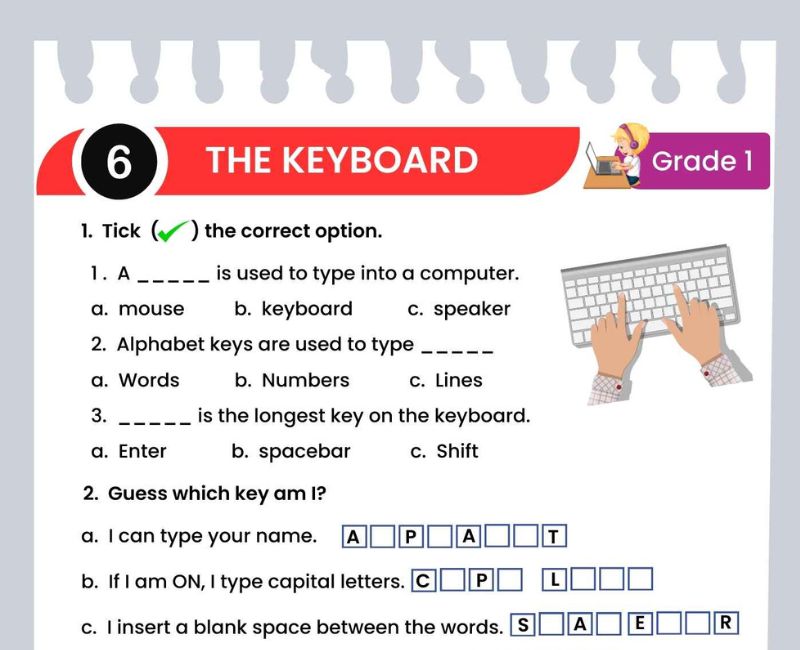
This Using the Keyboard Class 1 Worksheet introduces children to the keyboard and its important keys. Students learn to identify alphabet keys, number keys, the Spacebar, Enter, Backspace, Caps Lock, Shift and arrow keys.
Children begin by understanding that the keyboard is an input device. They can then practise finding letters and numbers and learn how special keys help them while typing.
For example, alphabet keys help us type our names, number keys help us write numbers, and the Spacebar creates spaces between words. The Backspace key can remove a character when we make a typing mistake.
This printable keyboard worksheet for Class 1 supports computer lab lessons, classroom activities, homework and revision. Teachers can combine the worksheet with practical keyboard demonstrations.
The additional exercises on this page include fill-in-the-blanks, matching questions, true-or-false statements, short answers and keyboard practice tasks. Children can also attempt the 20-question online quiz above and review their answers.
Learning to use the keyboard helps young students develop confidence with computers. Regular practice also supports letter recognition, number recognition, hand-eye coordination and early typing skills.
What Is a Keyboard for Class 1?
A keyboard is an input device used to type letters, numbers and symbols into a computer. It has many keys that perform different functions.
⌨️ We use a keyboard to type our names.
🔤 We use alphabet keys to type letters.
🔢 We use number keys to type numbers.
📝 We use special keys to make typing easier.
A standard English computer keyboard usually has 26 alphabet keys. Most keyboards also have a row of number keys from 0 to 9. The exact layout and number of keys can vary between keyboards.
Different Types of Keys on a Keyboard
Used to type letters from A to Z.
Used to type numbers from 0 to 9.
Used to insert a space between words.
Used to start a new line in many typing programs or confirm certain actions.
Usually removes the character before the cursor.
Changes how letters are typed, commonly enabling capital letters.
Helps type capital letters and the upper symbols shown on keys.
Help move the cursor or selection in different directions.
1. Alphabet Keys – A to Z
Alphabet keys are used to type letters. A standard English keyboard has 26 alphabet keys, one for each letter of the English alphabet.
These keys are not arranged in alphabetical order on a typical keyboard. Many English keyboards use the QWERTY layout, named after the first six letter keys on the top letter row.
Typing practice: CAT, DOG, SUN, BALL, APPLE
Ask students to find the letters in their own names on the keyboard.
2. Number Keys – 0 to 9
Number keys help us type numbers. On a standard keyboard, the main number keys are usually found in a row above the alphabet keys.
We use number keys to type ages, dates, counting numbers and other numerical information.
Typing practice: 1 2 3 4 5
Try next: 10 20 30 40 50
Some full-size keyboards also have a separate number pad on the right-hand side.
3. Spacebar Key – Making Spaces
The Spacebar is a long key usually found at the bottom of the keyboard. It is used to insert a blank space while typing.
When we type two words, we usually press the Spacebar once between them.
Without spaces: ILoveMySchool
With spaces: I Love My School
The Spacebar helps make our sentences easy to read.
4. Enter Key – Starting a New Line
The Enter key is an important special key. In many word-processing programs, it moves the typing cursor to a new line.
Example: Type your name, press Enter and type your class on the next line.
Aarav
Class 1
The Enter key can also confirm commands or selections in some programs. Its function depends on what the user is doing.
5. Backspace Key – Correcting Mistakes
The Backspace key helps us correct typing mistakes. It usually removes the character just before the cursor.
Typed: CATT
Press Backspace once at the end: CAT
Children can practise typing a word with an extra letter and then correcting it using Backspace.
6. Caps Lock and Shift Keys
Caps Lock Key
Caps Lock is commonly used to type capital letters continuously. Pressing it again usually turns this mode off.
Shift Key
Holding Shift while pressing a letter key usually types a capital letter when Caps Lock is off. Shift is also used to type symbols shown on the upper part of some keys.
For Class 1, students can practise typing their first names with a capital first letter.
7. Arrow Keys – Moving the Cursor
Arrow keys help move the cursor or selection in different directions. They are useful when editing text and navigating some programs.
Ask students to observe what happens when they press arrow keys in a simple text editor with several lines of text.
Important Keyboard Keys and Their Uses – Class 1 Chart
| Key | Use | Example |
|---|---|---|
| Alphabet keys | Type letters | CAT |
| Number keys | Type numbers | 123 |
| Spacebar | Insert spaces | MY SCHOOL |
| Enter | New line or confirm | Move to next line |
| Backspace | Remove character before cursor | Correct a word |
| Caps Lock | Enable capital-letter typing | HELLO |
| Shift | Capital letters or upper symbols | Shift + A |
| Arrow keys | Move cursor or selection | Move left or right |
Using the Keyboard Class 1 Worksheet – Questions and Answers
Exercise 1: Fill in the Blanks
- A keyboard is an ______ device.
- A standard English keyboard has ______ alphabet keys.
- We use ______ keys to type numbers.
- The ______ key is used to leave a space between words.
- The ______ key usually removes the character before the cursor.
- The ______ key can move the cursor to a new line in a text editor.
- The ______ Lock key helps us type capital letters continuously.
- We use ______ keys to move the cursor in different directions.
- The ______ key helps us type a capital letter while we hold it.
- The long key at the bottom of a keyboard is called the ______.
Show Exercise 1 Answers
1. input; 2. 26; 3. number; 4. Spacebar; 5. Backspace; 6. Enter; 7. Caps; 8. arrow; 9. Shift; 10. Spacebar.
Exercise 2: True or False
- A keyboard is used for typing.
- A standard English keyboard has 26 alphabet keys.
- The Spacebar is used to print a picture.
- Number keys help us type numbers.
- Backspace can help us correct typing mistakes.
- The Enter key is always used to turn off the computer.
- Arrow keys can move the cursor.
- Caps Lock is used to produce sound.
- We should press keyboard keys gently.
- Shift can help us type capital letters.
Show Exercise 2 Answers
1. True; 2. True; 3. False; 4. True; 5. True; 6. False; 7. True; 8. False; 9. True; 10. True.
Exercise 3: Match the Following
| Column A | Column B |
|---|---|
| 1. Spacebar | A. Types numbers |
| 2. Backspace | B. Inserts a space |
| 3. Number keys | C. Moves the cursor |
| 4. Arrow keys | D. Removes a character |
| 5. Enter | E. Starts a new line in many text editors |
Show Exercise 3 Answers
1-B, 2-D, 3-A, 4-C, 5-E.
Exercise 4: Choose the Correct Answer
- Which key helps us insert a space? (Spacebar / Backspace)
- Which keys help us type A, B and C? (Alphabet / Number)
- Which key helps remove an extra letter before the cursor? (Backspace / Enter)
- Which key can start a new line? (Enter / Spacebar)
- Which keys help us move the cursor? (Arrow keys / Number keys)
- Which key can help type capital letters? (Shift / Spacebar)
Show Exercise 4 Answers
1. Spacebar; 2. Alphabet; 3. Backspace; 4. Enter; 5. Arrow keys; 6. Shift.
Exercise 5: Answer in One Sentence
- What is a keyboard?
- What are alphabet keys?
- What are number keys?
- What is the use of the Spacebar?
- What is the use of Backspace?
- What is the use of the Enter key?
Show Exercise 5 Answers
- A keyboard is an input device used to type letters, numbers and symbols.
- Alphabet keys are used to type letters.
- Number keys are used to type numbers.
- The Spacebar inserts a space between words.
- Backspace usually removes the character before the cursor.
- Enter can move the cursor to a new line in many typing programs.
Fun Keyboard Activities for Class 1
1. Find the Letters
Ask students to find A, B, C, D and E on a keyboard. Repeat with the letters in their own names.
2. Type Your Name
Students type their names in a simple text editor under teacher supervision. Encourage them to use the Spacebar correctly when typing more than one word.
3. Number Typing Challenge
Children type numbers from 1 to 10 and then try numbers such as 12, 25 and 50.
4. Spacebar Practice
Ask children to type the words "MY SCHOOL" and "GOOD MORNING" with the correct spaces.
5. Correct the Word
Type "BOOKK" and ask students to use Backspace to change it to "BOOK".
6. Enter Key Practice
Students type three words on separate lines by pressing Enter between them.
7. Keyboard Colouring Activity
Give children a keyboard outline. Ask them to colour alphabet keys one colour, number keys another colour and the Spacebar a third colour.
8. Keyboard Detective
Call out a key name and ask students to point to it. Include Enter, Backspace, Caps Lock and arrow keys.
Good Habits While Using a Keyboard
✅ Sit comfortably while typing.
✅ Keep the keyboard on a stable surface.
✅ Press the keys gently.
✅ Keep your hands clean and dry.
✅ Practise typing slowly and accurately.
✅ Ask a teacher for help when needed.
❌ Do not hit the keyboard.
❌ Do not eat or drink over the keyboard.
❌ Do not pull or twist keyboard cables.
Children should focus on recognising keys and typing correctly before trying to increase their typing speed.
Why Is Learning to Use a Keyboard Important for Class 1?
Keyboard skills are an important part of early computer education. A keyboard helps children interact with computers by entering letters, numbers and simple instructions. Understanding the different keys makes basic computer activities easier.
Class 1 students often begin with letter recognition. Finding alphabet keys on a keyboard gives them another opportunity to identify letters outside books and notebooks. Children also practise connecting written letters with their positions on a physical device.
Number keys support early numeracy. Students can type counting numbers and practise recognising digits. This links Computer Studies with basic Mathematics.
Special keys introduce useful typing skills. The Spacebar helps children understand the importance of spaces between words. The Enter key can help organise text into lines, while Backspace teaches them how to correct typing mistakes.
Keyboard activities also support hand-eye coordination. Children look at the screen while pressing keys and observe how their actions affect the text. These activities can gradually improve familiarity with digital tools.
Learning to type does not require children to memorise the entire keyboard immediately. Teachers can begin with a few familiar letters and numbers, then introduce more keys through short practice sessions.
Colourful worksheets are helpful because they let students identify and match keys even when a computer is unavailable. Children can complete matching activities, fill in missing key names and practise answering simple questions.
Practical demonstrations make the topic more meaningful. For example, a teacher can type two words without a space and then insert one to show how the Spacebar improves readability.
The interactive online quiz on this page provides another way to revise keyboard functions. Students can answer 20 questions, receive a score and review explanations for each answer.
By the end of the lesson, children should be able to identify common keyboard keys, explain their basic uses and demonstrate simple typing actions with adult guidance.
Teaching Tips for Parents and Teachers
Start by showing children a real keyboard or a large picture of one. Ask them what they notice and explain that the buttons are called keys.
Introduce alphabet keys first because children are already familiar with letters. Ask students to find the letters of their names.
Next, introduce number keys. Let children locate numbers from 0 to 9 and type short number sequences.
Demonstrate the Spacebar using two short words. Then show how Backspace corrects a mistake and how Enter can move to a new line.
Introduce Caps Lock, Shift and arrow keys with simple demonstrations rather than complicated definitions.
Use the worksheet for matching, colouring and short-answer activities. Encourage children to explain what each key does using their own words.
Finish the lesson with the 20-question online quiz. Review the explanations together and give students extra practice with any keys they find difficult.
Related Class 1 Computer Worksheets
Frequently Asked Questions About Using the Keyboard for Class 1
What is a keyboard for Class 1?
A keyboard is an input device used to type letters, numbers and symbols into a computer.
How many alphabet keys are on a keyboard?
A standard English keyboard has 26 alphabet keys, one for each letter from A to Z.
How many number keys are on a keyboard?
The main number row has ten number keys, from 0 to 9. Some keyboards also have a separate number pad.
What is the use of the Spacebar?
The Spacebar inserts a blank space while typing.
What is the use of the Enter key?
Enter can start a new line in many text editors and can confirm certain commands.
What is the use of Backspace?
Backspace usually removes the character immediately before the cursor.
What is the use of Caps Lock?
Caps Lock commonly enables typing capital letters until it is turned off.
What is the use of the Shift key?
Shift helps type capital letters and certain symbols while it is held down.
What are arrow keys?
Arrow keys help move the cursor or selection up, down, left and right.
What are alphabet keys?
Alphabet keys are the keys used to type letters of the alphabet.
What are number keys?
Number keys are used to type digits such as 1, 2, 3 and 4.
Is a keyboard an input or output device?
A keyboard is an input device because it sends typing information to the computer.
What is the longest key on a typical keyboard?
The Spacebar is usually the longest key on a standard keyboard.
How can Class 1 students practise keyboard skills?
Students can identify keys, type names, enter numbers, practise spaces and correct mistakes using Backspace.
Does this page include an online keyboard quiz?
Yes. Students can attempt a 20-question multiple-choice quiz with a timer, score, explanations and retake option.
🎯 Online Using the Keyboard Quiz for Class 1 – Printable PDF and Computer Practice
Use this Using the Keyboard Class 1 worksheet alongside the free interactive quiz to practise identifying alphabet keys, number keys, Spacebar, Enter, Backspace, Caps Lock, Shift and arrow keys. Students can answer 20 multiple-choice questions, check their scores and review explanations. This combination of a printable keyboard worksheet for Class 1 PDF and online Computer Studies practice supports regular revision at home and in the classroom.
↑ Start the Online Keyboard Quiz Download