CLASS 2 MATHS • THE COLOURFUL DATA DISCOVERY CLUB
Data Handling Worksheets for Class 2
with Online Activities and Quiz
Collect a vote, build a graph and discover the story in the numbers. Explore tally marks, pictographs and bar charts with colourful models and thinking challenges.
Build and Explore
Sort votes, make tally groups and build picture and bar graphs.
See Hear and Do
Collect a survey, read a key and compare categories.
Think It Through
Find missing data, notice ties and create more than one valid graph.
Data Handling Class 2 Online Quiz
Changes quiz questions, answers, explanations and chart labels. Activities and learning guide remain in English.
Question 1 / 20 • Easy
How many votes did Apples receive?
Tap an answer to continue.
Quiz and listening guide
Try 10 easy, five average and five thinking questions. The 20-minute timer starts with the first answer or question-navigation action. Read-aloud alone does not start it. Answers advance except at the final question. Review using the question numbers. Submission or timeout shows every explanation. Restart clears answers and pauses the timer. Speech depends on the browser and available voices; all questions and instructions remain visible.
Five Data Handling Adventure Games
Tap the raised selector to choose a game. Each one has five challenges.
Sort the Fruit Votes
Choose a fruit category, then classify each recorded response.
Sort every fruit response into its correct category.
Read the labels and key. Count each vote once.
Five Hands-On Online Data Handling Activities
Use a model, listen if you wish and explain what the data tells you.
Data Handling Reasoning and Extra Practice
Data Word Problems
Use the graph to find totals or differences.
Each child chose one fruit. How many children answered?
Read the labels and key. Count each vote once.
How the activity sets work
Five games, five activities and five extra-practice sets provide 75 tasks, separate from the quiz. Games and activities share one active main workspace. Extra practice is independent. Switching sets keeps progress while this page stays open. Use Reset options for one task or its whole set. Work in short sessions. Read-aloud, diagrams, counters and physical suggestions are optional ways to explore the same idea.
Eight Data Handling Tips for Children
- Read the title and category labels.
- Check what one picture represents.
- Count tally marks in groups of five.
- Read bar lengths from the zero baseline and labelled scale.
- Add category counts to find a total when every item belongs to exactly one category.
- Subtract smaller counts from larger counts to find how many more.
- Look for ties and categories with zero.
- Use the recorded data rather than guessing.
Five Tips for Parents and Teachers
- Begin with real objects and one-picture-one-item graphs.
- Keep each survey question clear and count each response once.
- Use equal-size symbols and consistent graph scales.
- Offer optional listening, pictures, sorting and practical surveys as flexible participation choices.
- Introduce a two-item pictograph key only when children are ready.
Data Handling Worksheets for Class 2 Guide Examples and Reasoning
Which fruit received the most votes? Do four pictures always mean four children? These data handling worksheets for Class 2 help children collect, organise, represent and interpret information. Use the printable worksheet on this page with the online activities for sorting, tally marks, pictographs, frequency tables and simple bar graphs.
This is a general topic resource rather than a named NCERT chapter. Start with small counts and a key of one. The key-of-two tasks are supported extensions. Every fruit survey in these practice tasks records one fruit choice per child, so category totals can be added to find the number of responses.
What Is Data Handling?
Data is recorded information. A class survey might collect each child’s favourite fruit. Data handling means organising these responses, showing them clearly and answering questions about them. In these examples, Apples, Bananas and Mangoes are categories, and the number of votes in each category is its frequency.
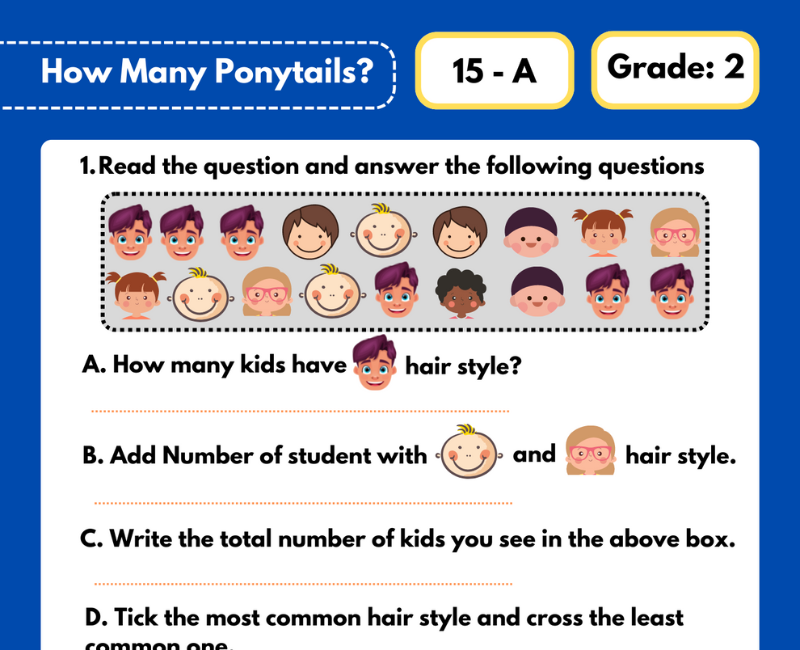
How Many Ponytails and Data Handling Practice
Counting features in a group, such as how many ponytails are recorded, offers a familiar way to organise simple data. Use clearly defined categories, record each observation once and represent the counts with a table or pictograph. The activities here extend these data-handling ideas using fruit-vote examples.
Sorting and Counting Worksheets
Place each response in the correct category and count it once. If a child chooses apples, add that vote to Apples rather than to both Apples and Mangoes. Consistent categories prevent missing or double-counting responses. If categories overlap in a different survey, do not simply add them to find the number of people without checking the rules.
Tally Marks for Class 2
Use one tally mark for each response. Four upright strokes followed by a diagonal stroke across them make a group of five. Seven is one complete group of five and two more strokes. Ten is two groups of five.
The online models draw actual groups of five with a diagonal fifth stroke. Count the groups first, then add leftover strokes. An empty tally row records zero rather than a missing category.
Frequency Tables
A frequency table pairs each category with its count. If Apples has five votes, Bananas three and Mangoes four, the total is 5 + 3 + 4 = 12 responses. Because every child chose exactly one category in this survey, that is twelve children.
A table needs clear labels. A bare list of numbers does not explain which count belongs to which category or what was counted.
Pictographs and Picture Graphs
A pictograph uses repeated pictures or symbols to represent quantities. Always read the key. If one dot represents one vote, five dots represent five votes. If one dot represents two votes, five dots represent ten votes.
A row contains four dots and the key says one dot = two votes. The row represents 4 × 2 = 8 votes, not four.
The same pictograph uses the same key for every category. These activities use whole symbols and counts that match the key; they do not require half-symbol interpretation.
Bar Graphs for Class 2
A bar graph shows category counts using bars. These horizontal graphs start at zero, use equal-width bars and have a labelled scale in votes. Read the end of each bar against the scale. Longer bars represent larger counts when the scale is shared.
Changing the colour of a bar does not change its count. Labels and the scale carry the information. A zero count is shown by no bar length at the baseline, while its category label remains.
Most Least and Equal Counts
The most popular category has the largest count. The least popular has the smallest count, including zero if zero is present. More than one category can tie for the most or least. If Apples and Bananas each have six votes and Mangoes has two, both Apples and Bananas are tied for most.
Do not force one winner when the data has a tie. The selection tasks accept every category that shares the largest count.
How Many More and Total Questions
Apples has eight votes and Bananas has five. Apples has 8 − 5 = 3 more votes.
Category counts of four, six and three total 4 + 6 + 3 = 13 responses in a one-choice survey.
“How many more” asks for a difference. “How many altogether” asks for a total. Read the actual question before choosing an operation.
Missing Data Questions with Solutions
A survey has fifteen responses. Apples has six and Bananas has four. Mangoes must have 15 − 6 − 4 = 5 responses. Check by adding all three category counts to recover fifteen.
The missing-table activity hides one frequency and provides the total and the other two counts. It does not reveal the hidden count in a completed graph.
Collecting and Representing Survey Data
Ask a clear question, record each response once, organise the counts and choose a display. The Survey Recorder lets children process one response at a time and undo the last response when necessary. The running graph and processed-response total must agree.
A small classroom survey describes that group of respondents. It does not prove that every child everywhere has the same preference.
Reasoning Questions with Answers
- Does an empty row always mean the label should be removed?
No. A category may have zero responses and still belong in the graph.
- Can different graphs have the same total?
Yes. Counts of six, two and four and counts of five, three and four both total twelve. The open design lab accepts every set meeting its rules.
- Why can’t we compare pictograph symbol counts without reading the key?
A symbol may represent more than one item. Use the key to find the represented quantities first.
- Does a taller-looking page picture prove a larger count?
No. Read the key, labels and scale rather than decorative size.
- Can two categories both be most popular?
Yes, if they share the largest frequency.
Learning with Pictures Listening and Practical Surveys
Children can view graphs, hear questions, tap votes, build tally groups, explain comparisons or collect a small supervised survey. These are flexible ways to participate, rather than fixed learning-style labels. All instructions remain visible if browser speech is unavailable.
For practical work, give each participant one token and ask them to place it beside one fruit label. Count, tally and draw the results. Collect preferences without recording names or private personal details.
Using Printable Data Handling Worksheets with Online Activities
Begin with sorting, record a frequency table and represent the same counts in a graph. Ask children to explain one total, one difference and any tie. Use quiz review explanations to discuss errors and revisit the key-of-one activities before progressing to scaled pictographs.
More Class 2 Maths Practice
Frequently Asked Questions
What do data handling worksheets for Class 2 cover?
Sorting, counting, tally marks, frequency tables, pictographs, simple bar graphs, comparisons, totals, missing data and survey questions.
What is a tally mark?
A tally is a counting stroke. The fifth stroke crosses a group of four so full groups can be counted in fives.
What is a pictograph?
A graph that uses repeated pictures or symbols to show counts. Its key tells how much each symbol represents.
Why must children read a pictograph key?
One picture can mean one vote or more than one. Four symbols with a key of two represent eight votes.
What is a frequency table?
A table listing each category and its number of recorded responses.
How do children read a bar graph?
Read the title, category labels and scale. Follow each bar from zero to its endpoint.
How do we find how many more?
Subtract the smaller category count from the larger one.
Can two categories have the most votes?
Yes. If both share the highest count, they are tied for most.
Does zero belong in data handling?
Yes. A category can have no responses. Its label can remain with an empty tally row or zero-length bar.
Do open graph puzzles allow different answers?
Yes. They accept every set of counts within the stated limits that satisfies the total and comparison rule.
Can children listen and play without dragging?
Yes, when browser speech is available. Text stays visible, and controls use tapping, clicking and typing.
Is this a named NCERT chapter worksheet?
No. It is a general data-handling resource. Choose tasks according to the child’s current classroom sequence.
 Download